Contents
3.2. 2 字符串与数组
3.2.1. 1 字符串常用操作
1.1 获取字符串长度
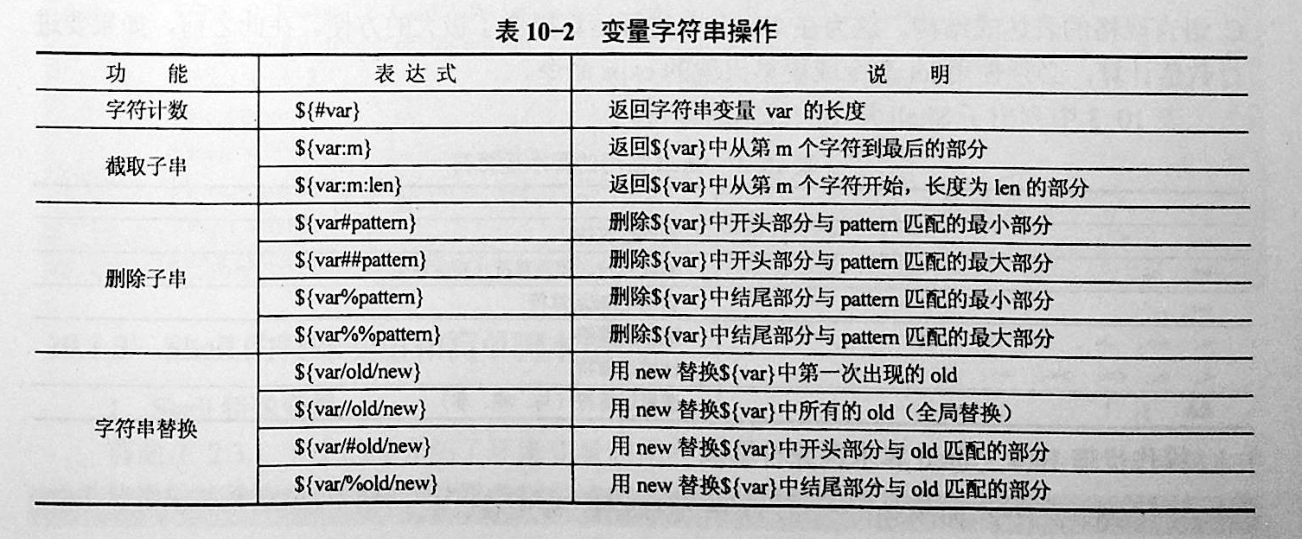
方式1 利用${#var}来获取字符串长度
[root@xuel-tmp-shell ~]# var='abcstring'
[root@xuel-tmp-shell ~]# echo ${#var}
9
方式2
# $string上的双引号必不可少
expr length "$string"
1.2 字符串切片
格式:
·${parameter:offset}

·${parameter:offset:length}
截取从 offset 个字符开始,向后 length 个字符。
[root@xuel-tmp-shell ~]# var="hello shell"
[root@xuel-tmp-shell ~]# echo ${var:0}
hello shell
[root@xuel-tmp-shell ~]# echo ${var:0:5}
hello
[root@xuel-tmp-shell ~]# echo ${var:6:5}
shell
[root@xuel-tmp-shell ~]# echo ${var:(-1)}
l
[root@xuel-tmp-shell ~]# echo ${var:(-2)}
ll
[root@xuel-tmp-shell ~]# echo ${var:(-5):2}
sh
1.3 字符串替换
格式:${parameter/pattern/string}
${PARAMETER/PATTERN/STRING}
${PARAMETER//PATTERN/STRING}
${PARAMETER/PATTERN}
${PARAMETER//PATTERN}
操作符“/”表示只替换一个匹配的字符串,而操作符“//”表示替换所有匹配的字符串。
如果没有指定替换字符串STRING,那么匹配的内容将被替换为空字符串,即被删除。
[root@xuel-tmp-shell ~]# var="hello shell"
[root@xuel-tmp-shell ~]# echo ${var/shell/world}
hello world

[root@swarm-manager2 Test]# MYSTRING="This is used for replacing string or removing string"
#替换字符串中一个匹配
[root@swarm-manager2 Test]# echo ${MYSTRING/string/characters}
This is used for replacing characters or removing string

##替换所有匹配
[root@swarm-manager2 Test]# echo ${MYSTRING//string/characters}
This is used for replacing characters or removing characters

# 删除一个匹配
[root@swarm-manager2 Test]# echo ${MYSTRING/string/}
This is used for replacing  or removing string

# 删除所有匹配
[root@swarm-manager2 Test]# echo ${MYSTRING//string/}
This is used for replacing  or removing
1.4 字符串删除
$ hujianli="hello fred,/home/fred, this is test var fred"

# 删除变量中匹配到1次的元素     /元素
$ echo ${hujianli/fred}
hello ,/home/fred, this is test var fred


# 删除变量中开头匹配到的元素   /#元素
$ echo ${hujianli/#fred}
hello fred,/home/fred, this is test var fred

# 删除变量中结尾匹配到的元素    /%元素
$ echo ${hujianli/%fred}
hello fred,/home/fred, this is test var

# 删除变量中所有匹配到的元素     //元素
$ echo ${hujianli//fred}
hello ,/home/, this is test var
字符串变量大小写转换
$ echo ${hujianli^^}
HELLO FRED,/HOME/FRED, THIS IS TEST VAR FRED

$ echo ${hujianli,,}
hello fred,/home/fred, this is test var fred
1.5 字符串截取
格式:
${parameter#word} # 删除匹配前缀
${parameter##word}
${parameter%word} # 删除匹配后缀
${parameter%%word}
# 去掉左边,最短匹配模式,##最长匹配模式。
% 去掉右边,最短匹配模式,%%最长匹配模式。
[root@xuel-tmp-shell ~]# url="https://www.baidu.com/index.html"
[root@xuel-tmp-shell ~]# echo ${url#*/}
/www.baidu.com/index.html
[root@xuel-tmp-shell ~]# echo ${url##*/}
index.html

[root@xuel-tmp-shell ~]# echo ${url%/*}
https://www.baidu.com
[root@xuel-tmp-shell ~]# echo ${url%%/*}
https:
1.6 变量状态赋值
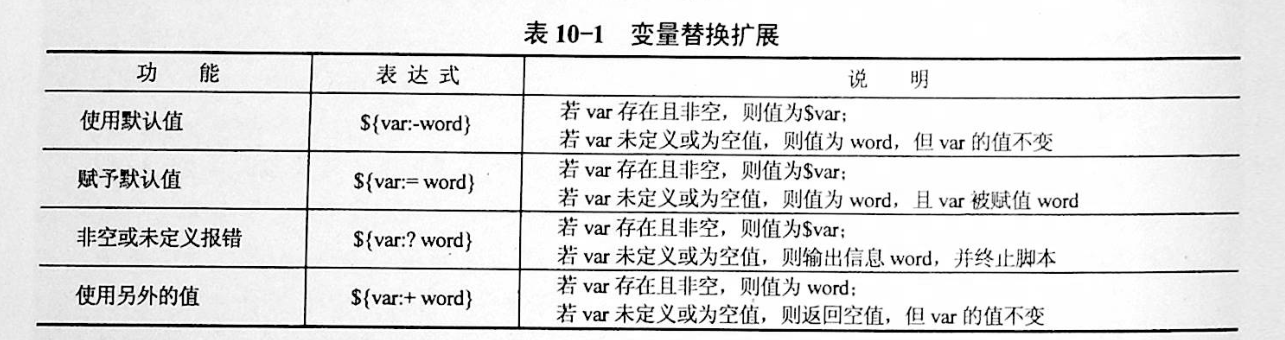
${VAR:-string} 如果 VAR 变量为空则返回 string
${VAR:+string} 如果 VAR 变量不为空则返回 string
${VAR:=string} 如果 VAR 变量为空则重新赋值 VAR 变量值为 string
${VAR:?string} 如果 VAR 变量为空则将 string 输出到 stderr
[root@xuel-tmp-shell ~]# url="https://www.baidu.com/index.html"
[root@xuel-tmp-shell ~]# echo ${url:-"string"}
https://www.baidu.com/index.html
[root@xuel-tmp-shell ~]# echo ${url:+"string"}
string
[root@xuel-tmp-shell ~]# unset url
[root@xuel-tmp-shell ~]# echo $url

[root@xuel-tmp-shell ~]# echo ${url:-"string"}
string
[root@xuel-tmp-shell ~]# echo ${url:+"string"}


找出/etc/group下的所有组名称
for i in `cat /etc/group`;do echo ${i%%:*};done
3.2.2. 2. Shell变量操作
2.1 变量替换扩展
2.2 变量字符串操作
2.3 代码总结
#!/usr/bin/env bash
##################### 变量赋值 ##################################################
WORD=car
echo $WORD

###################### 间接参数扩展 ###############################################
PAR=TEMP
TEMP="Thfiles files test TEMP"

echo ${!PAR}
echo $PAR


##################### 大小写修改 ####################################################
# 首字母大写
echo ${TEMP^}
# 全部大写
echo ${TEMP^^}
# 首字母小写
echo ${TEMP,}
# 全部小写
echo ${TEMP,,}
# 首字母小写
echo ${TEMP~}
# 大小写转换
echo ${TEMP~~}


# ----------------- 将当前目录下的所有后缀为txt的文件名转换为小写 --------------
#for file in *.txt ; do
#    mv "$file" "${file,,}"
#done


#############################  字符串移除 ###################################################
MYSTRING="This is used for removing string"

# 从左到右分割显示第一个空格之后的内容
echo ${MYSTRING#* }   # is used for removing string

# 从左到右分割显示最后一个空格之后的内容
echo ${MYSTRING##* }  # string


# 从右到左分割显示第一个空格之后的内容
echo ${MYSTRING% *}     # This is used for removing

# 从右到左分割显示最后一个空格之后的内容
echo ${MYSTRING%% *}    # This


#-------------------------- 最常用的用途是提取文件名的一部分 --------------
FILENAME=linux_bash.txt
echo ${FILENAME%.*}        #移除文件名的后缀    #linux_bash

echo ${FILENAME##*.}       #移除文件名,保留后缀  #txt


FILENAME=/home/yantaol/linux_bash.txt
echo ${FILENAME%/*}        #移除文件名,保留目录名   #/home/yantaol

echo ${FILENAME##*/}       #移除目录名,保留文件名   #linux_bash.txt


################################################## 字符串搜索与替换 #############################
# 操作符“/”表示只替换一个匹配的字符串,而操作符“//”表示替换所有匹配的字符串。如果没有指定替换字符串STRING,那么匹配的内容将被替换为空字符串,即被删除。
MYSTRING="This is used for replacing string or removing string"
# 替换一次
echo ${MYSTRING/string/characters }
# 替换全部
echo ${MYSTRING//string/characters }

# 删除一次
echo ${MYSTRING/string }
echo ${MYSTRING//string }
# 删除全部
echo ${MYSTRING//string/}


############################################### 求字符串长度 ######################################
# 求字符串长度
# ${#PARAMETER}
MYSTRING="Hello World"
echo ${#MYSTRING}

# 子字符串扩展:
#${PARAMETER:OFFSET}
#${PARAMETER:OFFSET:LENGTH}

#这种参数扩展格式将扩展参数值的一部分,从指定的位置开始截取指定长度的字符串,如果省略LENGTH,将截取到参数值的末尾
MYSTRING="This is used for substring expansion."
echo ${MYSTRING:8}    # used for substring expansion.
echo ${MYSTRING:8:10} # used for s


################################################ 使用默认值 ##########################################
#${PARAMETER:-WORD}

#${PARAMETER-WORD}

#如果参数PARAMETER是未定义,或为null时,这种模式会扩展WORD,否则将扩展参数PARAMETER。如果在PARAMETER和WORD之间略去了符号“:”,即上述语法中的第二种格式,只有参数PARAMETER是未定义时,才会使用WORD

unset MYSTRING  # 解除环境变量
echo ${MYSTRING:-Hello World}

unset MYSTRING  # 解除环境变量
MYSTRING=
echo ${MYSTRING:-Hello World}

MYSTRING=Hi
echo ${MYSTRING:-Hello World}

unset MYSTRING  # 解除环境变量
MYSTRING=
# 当变量为空值时,去掉:打印空值,空值也是参数
echo ${MYSTRING-Hello World}


echo "------------------------------------ 华丽的分割线 -----------------------------------------------"
##################################################### 指定默认值 ########################################
#${PARAMETER:=WORD}

#${PARAMETER=WORD}

#这种模式与使用默认值的模式类似,但其区别在于,此种模式不仅扩展WORD,还将WORD赋值给参数PARAMETER,作为PARAMETER的值

echo ${MYSTRING_hu:=Hello World}
echo $MYSTRING_hu

echo ${MYSTRING_hu1=Hello World}
echo $MYSTRING_hu1

echo "------------------------------------ 华丽的分割线 -----------------------------------------------"
#################################################### 使用替代值 ###################################

#${PARAMETER:+WORD}

#${PARAMETER+WORD}

#如果参数PARAMETER是未定义的,或其值为空时,这种模式将不扩展任何内容。如果参数PARAMETER是定义的,且其值不为空,这种模式将扩展WORD,而不是扩展为参数PARAMETER的值。

MYSTRING722=""
echo ${MYSTRING:+ NOTE: MYSTRING seems to be set.}

MYSTRING="Hi"
echo ${MYSTRING:+ NOTE: MYSTRING seems to be set.}
3.2.3. 3 数组
bash支持一维数组(不支持多维数组),并且没有限定数组的大小。数组是相同类型的元素按一定顺序排列的集合。 类似与 C 语言,数组元素的下标由 0 开始编号。获取数组中的元素要利用下标,下标可以是整数或算术表达式,其值应大于或等于 0。
3.1 数组定义
在 Shell 中,用括号来表示数组,数组元素用”空格”符号分割开
3.2 通过元素值集合来创建数组变量
#! /bin/bash

# 定义数组
array=(1 2 3 4 5 6 7 8)
# 输出第 1 个数组元素的值
echo "the first element is ${#array[0]}"
# 输出所有元素的值
echo "the elements of this array are ${array[@]}"
# 输出数组长度
echo "the size of the array is ${#array[@]}"
计算数组的长度
${#array[@]}
或者
${#array[*]}

#array表示数组名称,方括号中的@或者*是通配符,表示匹配所有的元素。
3.3 通过键值对定义数组
#! /bin/bash

# 定义数组
array=([1]=one [4]=four)
# 输出数组长度
echo "the size of the array is  ${#array[@]}"
# 输出索引为 4 的元素的值
echo "the fourth element is ${array[4]}"
3.4 数组元素读取
[root@xuel-tmp-shell ~]# args1=(aa bb cc 1123)
[root@xuel-tmp-shell ~]# echo ${#args1[@]}     #获取数组元素个数
4
[root@xuel-tmp-shell ~]# echo ${args1[0]}
aa
[root@xuel-tmp-shell ~]# echo ${args1[1]}
bb

[root@monitor workspace]# filelist=($(ls))
[root@monitor workspace]# echo ${filelist[*]}
check_url_for.sh check_url_while01.sh check_url_while02.sh func01.sh func02.sh func03.sh urllist.txt

获取数组元素的下标
[root@monitor workspace]# echo ${!filelist[@]}
0 1 2 3 4 5 6
遍历数组
方式1
#! /bin/bash

# 定义数组
array=(Mon Tue Wed Thu Fri Sat Sun)
# 通过下标访问数组
for (( i = 0; i < ${#Ip_array[@]}; i++ )); do
    echo $i ${array[i]}
done
方式2
#! /bin/bash

array=(Mon Tue Wed Thu Fri Sat Sun)
# 获取数组长度
len="${#array[@]}"
# 通过循环结构遍历数组
for ((i=0;i<$len;i++))
do
   echo "${array[$i]}"
done
遍历文件
filelist=($(ls));for i in ${!filelist[@]};do echo ${filelist[$i]};done
3.5 以切片方式获取部分数组元素
#! /bin/bash
#在上面的代码中,第4行定义了一个含有7个元素的数组。第6行从下标为2的数组元素开始,截取其中的4个元素。
linux=("Debian" "RedHat" "Ubuntu" "Suse" "Fedora" "UTS" "CentOS")
# 数组切片
var=${linux[@]:2:4}
echo "$var"
[root@linux chapter7]# ./ex7-19.sh
Ubuntu Suse Fedora UTS
演示将切片结果以数组形式保存的方法。本例将切片的结果赋给了一个新的数组变量,然后输出新的数组的长度,最后通过循环输出所有的数组元素
#! /bin/bash

# 定义数组
linux=("Debian" "RedHat" "Ubuntu" "Suse" "Fedora" "UTS" "CentOS")

# 切片
array=(${linux[@]:2:4})
# 获取新的数组的长度
length="${#array[@]}"
# 输出数组长度
echo "the length of new array is $length"
# 通过循环输出各个元素
for ((i=0;i<$length;i++))
do
   echo "${array[$i]}"
done
3.6 通过declare语句定义关联数组
其基本语法如下:
declare -a array
declare -A dic
在上面的语法中,-a选项表示后面定义的是一个数组,其名称为array。
关联数组 —> shell中的字典
# -A 举例,字典类型的关联数组
declare -A dic
dic=([no1]="hujianli1" [no2]="hujianli2" [no3]="hujianli3")

echo ${dic[no3]}        #hujianli3
#打印所有的key
echo ${!dic[*]}         # no3 no2 no1

#打印所有的value
echo ${dic[*]}          # hujianli3 hujianli2 hujianli1

# 变量key和value
$ for i in ${!dic[*]}; do echo ${i}:${dic[$i]}; done
no3:hujianli3
no2:hujianli2
no1:hujianli1
关联数组必须以大写的declare -A命令来进行声明
$ declare -A array_example
$ array_example=([0]=centos7
                 [1]=centos6
                 [2]=ubuntu
                 [3]=redhat
                 [4]=suse
                 [5]=windows)

$ echo ${array_example[3]}
redhat

$ echo ${array_example[*]}
centos7 centos6 ubuntu redhat suse windows

$ echo ${array_example[@]}
centos7 centos6 ubuntu redhat suse windows

$ echo ${#array_example[@]}
6

# 显示所有的index下标
$ echo ${!array_example[*]}
0 1 2 3 4 5
举例说明
declare -A projects=(
    [test_chatsrv-frontend]="172.20.20.3"
    [test_chatsrv-core]="172.20.20.5"
    [test_chatsrv-storage]="172.20.20.5"
    [test_chatsrv-push]="172.20.20.5"
)

token="xxxxxxxxx"

for project in ${!projects[@]}; do
    client="${projects[${project}]}"
    curl -w '\n' 'http://deploy.ixiaochuan.cn/deploy' -H "Cookie: remember_token=${token};" --data "operation=update&project=${project}&client=${client}" --compressed --silent
done
#!/bin/sh
# @Author: hujianli
# @Date:   2018-11-18 15:03:18
# @Last Modified by:   hujianli
# @Last Modified time: 2018-11-18 15:15:13

: <<EOF
符号*是把原数组中的所有元素(除了用于区别元素的分隔符,通常是空格)当成一个元素复制到新数组中,生的新数组只有一个元素
符号@的含义是把原数组的内容复制到一个新数组中,生成的新数组和原来的是一样的
EOF

declare -a      #显示当前所有的数组
declare -ar BASH_VERSION='([0]="2"
                           [1]="05b"
                           [2]="0"
                           [3]="1"
                           [4]="release"
                           [5]="i386-redhat-linux-gnu")'
declare -a DIRSTACK='()'
declare -a GROUPS='()'
declare -a PIPESTATUS='([0]="0")'
declare -a student='([0]="张三"
    [1]="李四"
    [2]="王小二"
    [3]="李晓明"
    [4]="张四宝")'
declare -a score='([0]="66"
    [1]="70"
    [2]="80"
    [3]="90"
    [4]="98")'

echo ${student[@]}
echo ${student[*]}
#!/bin/sh
# @Author: hujianli
# @Date:   2018-11-18 13:59:12
# @Last Modified by:   hujianli
# @Last Modified time: 2018-11-18 14:04:47
student=("张三" "李四" "王五" "李晓明" "胡建力")
score=(66 70 80 84 99)

N=${#student[*]}        #计算数组的个数总和,赋值给变量N
echo "学生总数为:$N"
i=0
while [[ $i -lt $N ]]; do
    echo -e "\tstudent $[i]的考试成绩为:${score[$i]}"
    i=$(($i+1))
done
3.7 在数组末尾追加新元素
在Shell中,向已有的数组末尾追加新的元素非常方便。在通过索引为数组元素赋值时,如果指定的索引不存在,则Shell会自动添加一个新的元素,并且将指定的值赋给该元素。
演示如何在数组末尾追加新的数组元素
#! /bin/bash
# 定义数组
array=(1 2)
# 输出数组
echo "${array[@]}"
# 向数组末尾追加元素
array[2]=3
array[3]=4
echo "${array[@]}"
演示向关联数组追加新元素的方法
#! /bin/bash
# 定义数组
declare -A array
# 初始化数组
array=([a]=a [b]=b)

echo "the old elements are ${array[@]}"
# 向数组追加元素
array[c]=c
echo "the new elements are ${array[@]}"
3.8 通过循环为数组赋值
#! /bin/bash
# 通过循环为数组赋值
for i in {1..10}
do
   array[$i]=$i
done
# 输出元素的值
echo "${array[@]}"
3.9 数组元素的替换
数组元素替换的基本语法如下:
${array[@|*]/pattern/replacement}
演示如何对数组进行替换,以及如何将替换的结果赋给一个新的数组变量。
#! /bin/bash
# 定义数组
a=(1 2 3 4 5)
# 输出替换结果
echo "the result is ${a[@]/3/100}"
# 输出原始数组
echo "the old array is ${a[@]}"
# 将替换结果赋给一个数组变量
a=(${a[@]/3/100})
# 输出新的数组变量的值
echo "the new array is ${a[@]}"
该程序的执行结果如下:
[root@linux chapter7]# ./ex7-23.sh
the result is 1 2 100 4 5
the old array is 1 2 3 4 5
the new array is 1 2 100 4 5
3.10 删除数组
与删除其他的Shell变量一样,用户可以使用unset命令来删除某个数组元素,其基本语法如下:
unset array[n]
删除数组中的元素
#! /bin/bash

linux=("Debian" "RedHat" "Ubuntu" "Suse" "Fedora" "UTS" "CentOS")
# 输出原始数组长度
echo "the length of original array is ${#linux[@]}"
# 输出数组的原始值
echo "the old array is ${linux[@]}"
# 删除下标为 3 的元素
unset linux[3]
 输出新的数组的长度
echo "the length of new array is ${#linux[@]}"
# 输出新的数组的值
echo "the new array is ${linux[@]}"
删除整个数组
#! /bin/bash

linux=("Debian" "RedHat" "Ubuntu" "Suse" "Fedora" "UTS" "CentOS")
# 删除整个数组
unset linux
echo "${linux[@]}"
3.11 数组的其它操作
复制数组
所谓复制数组,是指创建一个已经存在的数组的副本。也就是将一个数组的内容全部存储到另外一个新的数组中。
在Shell中,用户可以通过以下语法来实现数组的复制:
newarray=("${array[@]}")
连接数组
连接数组是指将2个数组的数组元素连接在一起,变成一个大的数组。新的数组依次包含2个数组的所有的元素。数组连接的语法如下:
("$array1[@]}" "${array2[@]}")
示例
#! /bin/bash

# 定义 2 个数组
linux=("Debian" "RedHat" "Ubuntu" "Suse" "Fedora" "UTS" "CentOS")
shell=("bash" "csh" "ksh" "rsh" "sh" "rc" "tcsh")

# 连接数组
linuxshell=("${linux[@]}" "${shell[@]}")

# 输出合并后的数组
echo "the new array is ${linuxshell[@]}"
# 输出新的数组的长度
echo "the length of new array is ${#linuxshell[@]}"
加载文件内容到数组
#! /bin/bash
# 加载文件内容
content=(`cat "demo.txt"`)
# 通过循环输出数组内容
for s in "${content[@]}"
do
   echo "$s"
done
3.2.4. 4 字符显示颜色
字体颜色           字体背景颜色            显示方式
30:黑                40:黑
31:红                41:深红              0:终端默认设置
32:绿                42:绿                   1:高亮显示
33:黄                43:黄色              4:下划线
34:蓝色            44:蓝色             5:闪烁
35:紫色            45:紫色             7:反白显示
36:深绿            46:深绿             8:隐藏
37:白色            47:白色
格式:
\033[1;31;40m|  # 1 是显示方式,可选。31 是字体颜色。40m 是字体背景颜色。
\033[0m | # 恢复终端默认颜色,即取消颜色设置。
显示方式
for i in {1..8};do echo -e "\033[$i;31;40m hello world \033[0m";done
字体颜色
for i in {30..37};do echo -e "\033[$i;40m hello world \033[0m";done
背景颜色
for i in {40..47};do echo -e "\033[47;${i}m hello world! \033[0m";done
#!/usr/bin/env bash
#usage:xxx
#scripts_name:xxx.sh
# 文本颜色是由对应的色彩码来描述的。其中包括:重置=0,黑色=30,红色=31,绿色=32,
#  黄色=33,蓝色=34,洋红=35,青色=36,白色=37。


echo -e "\e[1;31m This is red text \e[0m"
echo -e "\e[1;32m This is green text \e[0m"
echo -e "\e[1;33m This is yellow text \e[0m"
echo -e "\e[1;34m This is blue text \e[0m"
echo -e "\e[1;35m This is Magenta text \e[0m"
echo -e "\e[1;36m This is 青色 text \e[0m"
echo -e "\e[1;37m This is white text \e[0m"
echo
echo

#对于彩色背景,经常使用的颜色码是:重置=0,黑色=40,红色=41,绿色=42,黄色=43,
# 蓝色=44,洋红=45,青色=46,白色=47。
echo -e "\e[1;41m Green Background \e[0m"
echo -e "\e[1;42m Green Background \e[0m"
echo -e "\e[1;43m Green Background \e[0m"
echo -e "\e[1;44m Green Background \e[0m"
echo -e "\e[1;45m Green Background \e[0m"
echo -e "\e[1;46m Green Background \e[0m"
echo -e "\e[1;47m Green Background \e[0m"


#定义一个颜色的函数
echo_color (){
    local color=$1
    local info=$2
    case "$color" in
    red)
        echo -e "\e[1;31m ${info} \e[0m"
       ;;
    green)
        echo -e "\e[1;32m ${info} \e[0m"
       ;;
    yellow)
        echo -e "\e[1;33m ${info} \e[0m"
       ;;
    blue)
        echo -e "\e[1;34m ${info} \e[0m"
       ;;
    Magenta)
        echo -e "\e[1;35m ${info} \e[0m"
    ;;
    cyan-blue)
        echo -e "\e[1;36m ${info} \e[0m"
    ;;
    esac

}


echo_color red "哈哈哈哈哈哈哈"
echo_color green "哈哈哈哈哈哈哈"
echo_color yellow "哈哈哈哈哈哈哈"
echo_color blue "哈哈哈哈哈哈"
echo_color Magenta "哈哈哈哈哈哈"